In today’s digital-first world, customer reviews can make or break a clinic’s reputation. Patients often check feedback before choosing a doctor, and even a handful of positive reviews can build strong trust. But here’s the catch: many satisfied patients simply walk away without leaving happy customer reviews. That’s where smart automation steps in.
We’ll explore how WhatsApp automation can help clinics collect more 5-star patient reviews, improve online reputation, and boost local visibility. You’ll also learn practical strategies, tools, and best practices to turn satisfied patients into powerful brand advocates.”
Why Customer Reviews Matter for Clinics
When it comes to healthcare, trust is everything. Platforms like Google heavily rely on customer ratings and reviews to rank clinics and influence patient decisions. More Google customer reviews mean better visibility, higher credibility, and ultimately, more appointments.
For clinics using solutions like ERP4dentist, managing and improving review collection becomes much more structured and effective.
The Real Problem – Happy Patients Don’t Leave Reviews
Most patients are willing to share feedback, but they forget, get busy, or don’t know where to start. Clinics often struggle with asking customers for reviews at the right time without sounding pushy. This gap leads to missed opportunities, even when patients are genuinely satisfied.
What is WhatsApp Automation for Customer Feedback?
WhatsApp automation allows clinics to send timely, personalized messages requesting feedback right after an appointment. Instead of manual follow-ups, tools integrated with systems like ERP4dentist can automatically trigger review requests, ensuring a smooth, consistent process.
Step-by-Step Process to Get Customer Reviews Using WhatsApp Automation
Step 1: Capture Patient Data
Start by collecting essential patient details such as:
- Phone number
This data serves as the foundation for your automated review system.
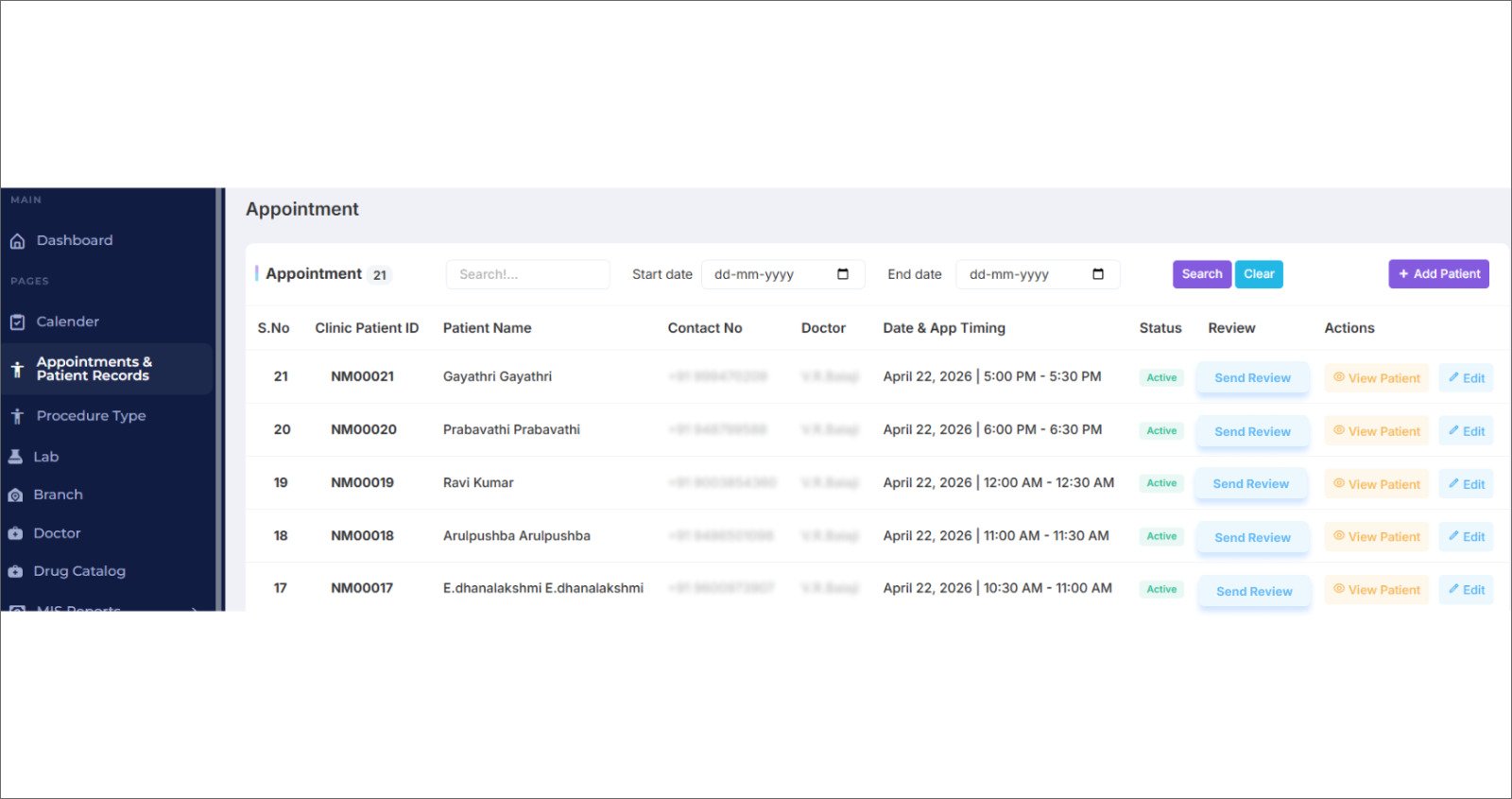
Step 2: Trigger Review Request from Dashboard
After the appointment is completed, your staff can simply click the Send Review button from the appointment dashboard.
This action automatically triggers the review workflow.
Step 3: Send WhatsApp Message to Patient
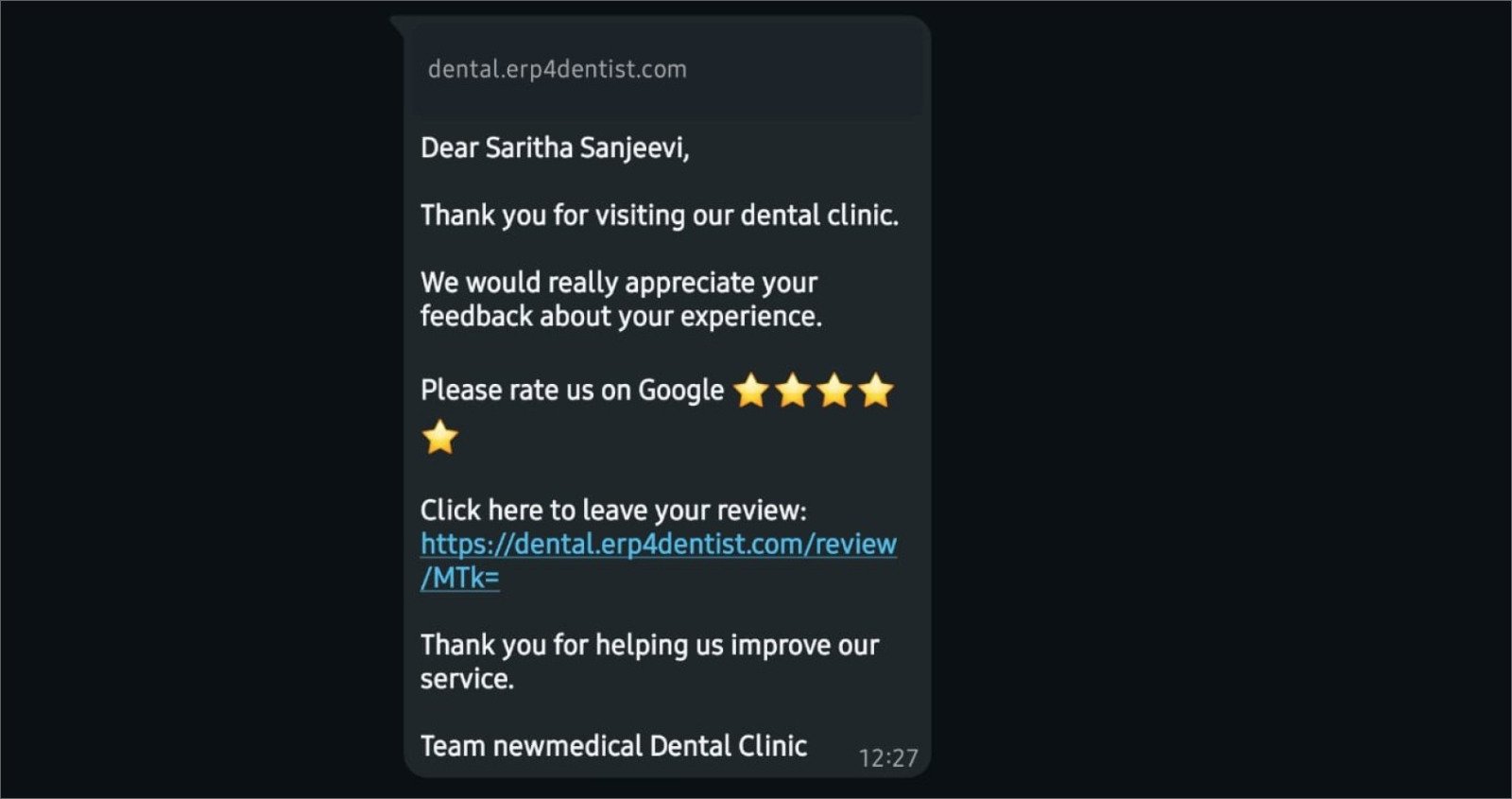
Once the button is clicked, an automated WhatsApp message is sent to the patient.
Example message:
“Hi [Name], thank you for visiting us today! We’d love your feedback. Could you take a moment to share your experience?”
Keep the message:
- Short
- Friendly
- Personalized
- dental clinic management software
Step 4: Include Google Review Link
To make it easy for patients, include a direct Google review link in the message.
This allows patients to leave their feedback instantly without any hassle.
Step 5: Time the Message Right
Send the review request within 24 hours of the appointment.
This ensures:
- The experience is still fresh
- Higher chances of getting a response
Step 6: Automate Follow-Ups
If the patient doesn’t respond, send a gentle reminder after 2–3 days.
Automation helps you:
- Avoid missed follow-ups
- Improve response rates
Step 7: Patient Submits Review
The patient clicks the link, leaves a review, and your clinic builds a stronger online reputation.
Common Mistakes to Avoid
When using WhatsApp automation to collect customer reviews, the goal is to feel helpful, not automated. Clinics often miss that balance. Here are a few mistakes to watch out for, especially when using systems like ERP4dentist:
- Automating without personalization
Sending the same message to every patient can feel impersonal. Even with automation in ERP4dentist, adding the patient’s name or treatment context makes your request for happy customer reviews feel genuine. - Poor timing of review requests
Triggering messages immediately after a procedure (especially complex ones) may not get the best response. Smart timing within ERP4dentist ensures patients are more comfortable and more willing to ask customers for reviews. - No direct path to leave reviews
If patients have to search for your page, they’ll likely drop off. Always include a clear, clickable link for Google customer reviews to reduce friction. - Over-automation without monitoring responses
Automation is powerful, but ignoring replies defeats the purpose. Clinics should actively track responses to improve customer ratings and reviews over time. - Not closing the feedback loop.
When patients leave reviews and receive no acknowledgment, it can feel one-sided. A simple thank-you message or response helps strengthen trust and encourages more patient reviews.
By avoiding these, clinics can turn WhatsApp automation into a meaningful patient engagement tool rather than just another notification.
Conclusion
Turning satisfied patients into online advocates doesn’t have to be complicated. With the right approach and tools like ERP4dentist, clinics can consistently generate meaningful customer ratings and reviews. A simple WhatsApp message at the right time can transform patient satisfaction into powerful digital credibility.
Ready to see the difference? Try a free trial today.
FAQ
- How does WhatsApp automation help in getting more customer reviews?
WhatsApp automation sends timely and personalized messages to patients after their visit, making it easy for them to share feedback instantly. This increases response rates and helps clinics consistently collect more customer reviews. - What is the best time to ask patients for a review?
The ideal time is within 24 hours after the appointment. During this period, the patient’s experience is still fresh, which improves the chances of receiving positive customer ratings and reviews. - Is it safe to send review requests through WhatsApp?
Yes, as long as you have the patient’s consent to communicate. Using secure systems, such as ERP4dentist, ensures patient data is handled properly when sending automated messages. - Can automation feel too robotic to patients?
It can if not done correctly. Personalizing messages with the patient’s name and treatment details makes the interaction feel natural and increases the likelihood of getting happy customer reviews. - How can I improve my Google customer reviews quickly?
Make the process simple by sharing a direct review link, sending reminders, and responding to every review. Consistency with tools like ERP4dentist can significantly boost your customer ratings and reviews over time.